- Virtual cards are single-use credit cards that payers issue instead of checks or ACH transfers.
- They provide faster funding (24–48 hours) but incur higher fees and require manual data entry.
- Manual processing risks duplicate postings, untracked cards, and revenue leakage.
- ACH remains more efficient and cost-effective than virtual card reimbursement.
- EHR-integrated payment systems speed up processes by recording virtual cards to claims.
Virtual card payments are single-use digital credit cards that insurance payers issue to reimburse medical practices. Instead of sending a paper check or ACH transfer, the payer sends card details that the practice processes like a standard credit card transaction. While virtual cards offer faster funding (typically 24–48 hours), they often carry higher interchange fees and require manual data entry. To minimize administrative burden, practices should use EHR-integrated payment tools that reconcile these cards to specific patient claims.
Virtual cards are the express lane of reimbursement: you move faster, but you pay a toll.
Usually, the money lands in your account within 48 hours as you bypass the delays of snail mail. But that speed comes with tradeoffs. Your billing team handles higher processing fees, manual data entry, and reconciliation steps that didn't exist with ACH or paper checks.
Many payers are shifting reimbursements to virtual cards. That means you need a clear process to capture payments quickly without creating an administrative bottleneck.This guide covers how virtual cards function and how to manage them efficiently.
What are virtual cards?
A virtual credit card (VCC) is a single-use credit card number that a payer generates for batch payments across visits or patients.
Instead of mailing a check or sending an ACH transfer, the insurance company issues a digital (or “virtual”) credit card with an explanation of benefits (EOB). You run the card like any other credit card transaction, and the funds are deposited into your account.
If the payer sends an electronic remittance advice (ERA), some payments platforms (such as Tebra) allow the payment record to be entered automatically from the file.
Think of it as a disposable credit card. Once you process the payment, the number expires. If you don't use it before the expiration date, reclaiming those funds can be difficult.
Virtual cards vs. ACH
| Factor | Virtual cards | ACH |
| Speed | 24–48 hours | 2–5 business days |
| Processing fees | Higher (interchange fees apply) | Lower or flat fee |
| Manual workload | Lower if receiving an ERA for payment, otherwise higher if manually recording information from EOB | Lower if receiving ERAs (auto-posts to account), otherwise higher for manual recording |
| Expiration risk | Yes (unused cards expire) | No |

Why do virtual cards continue to grow in volume?
Virtual card volume continues to climb across the industry. A report by Grand View Research estimates the virtual card payment market will reach $60.1B by 2030.

Payers favor virtual credit cards because they're cheaper to administer than checks and shift interchange costs to the practice. As of 2025, some payers default practices into virtual card programs unless you actively opt out and request ACH. Under HIPAA standards, you also have the right to decline virtual cards and insist on standard EFT (ACH) reimbursement instead.
Access the American Medical Association (AMA)'s education and recommendations about virtual card payments here.


"You need systems that can handle growing VCC volume without requiring additional headcount."
If you do choose to accept them (or cannot opt out of specific plans), you need systems that can handle growing VCC volume without requiring additional headcount. A few things worth building into your routine:
- Track your processing fees monthly so you understand what speed actually costs
- Audit for missed or expired cards regularly to prevent lost revenue
- Monitor payer performance to identify which insurers send the most VCCs
How do virtual cards work?
Understanding how virtual cards work helps you build processes that minimize friction.
Payer-issued virtual cards for reimbursement
When an insurance company reimburses your practice via VCC, they email or fax a card number, expiration date, CVV, and EOP.
Then, your billing team enters this information into your payment terminal or electronic health record (EHR)-integrated payment system. Once processed, the funds move to your bank account. This occurs entirely on the backend; patients do not see this transaction, but their payments clear faster.
Why should independent practices use virtual cards?
While ACH is often financially better due to lower fees, virtual cards offer specific operational advantages over paper checks:
Faster payment delivery
Most virtual card payments settle within 24–48 hours. This tightens cash flow and reduces the time claims sit in accounts receivable (A/R).
Compared to paper checks, which can take over a week to process, the speed difference is significant. That difference compounds when you're processing dozens of reimbursements each month.
Reduced reliance on paper checks
Virtual cards eliminate the need to open, endorse, and deposit physical checks. They also cut out mail delays and lower the risk of lost or stolen payments. If your team still handles a high volume of paper checks, these small manual tasks add up significantly across a billing cycle.
Predictable reimbursement timing
When you know a payment will land within 48 hours, you can plan payroll and vendor payments more confidently.
Currently, only 11% of practices use digital payment options, but those that do see a faster payment cycle and improved A/R aging.
Checklist: Steps to process a virtual card
- Receive the payer-issued card number and EOB.
- Enter the card number, expiration date, and CVV into your integrated payment terminal.
- Verify the payment amount matches the EOB before running the transaction.
- Allocate the payment to the correct patient accounts and claim line items.
- Flag any unresolved or unmatched cards for immediate follow-up.
How to process virtual card payments effectively
To effectively manage VCCs, you must integrate them cleanly into your revenue cycle processes.
Establish a daily virtual card reconciliation workflow
Centralize all incoming virtual card payments into a single queue. Assign ownership to a specific team member and reconcile payments at a set time each day. This routine reduces missed cards, posting delays, and reconciliation errors.
Use EHR-integrated payment tools
With Tebra's EHR-integrated payment tools, staff can process virtual cards and apply the payment to the correct insurance claims based on the amounts indicated on patients’ explanations of benefits (EOBs). Once processed, staff can document the last four digits of the card and the transaction confirmation number in the notes section to easily locate the payment later if needed.
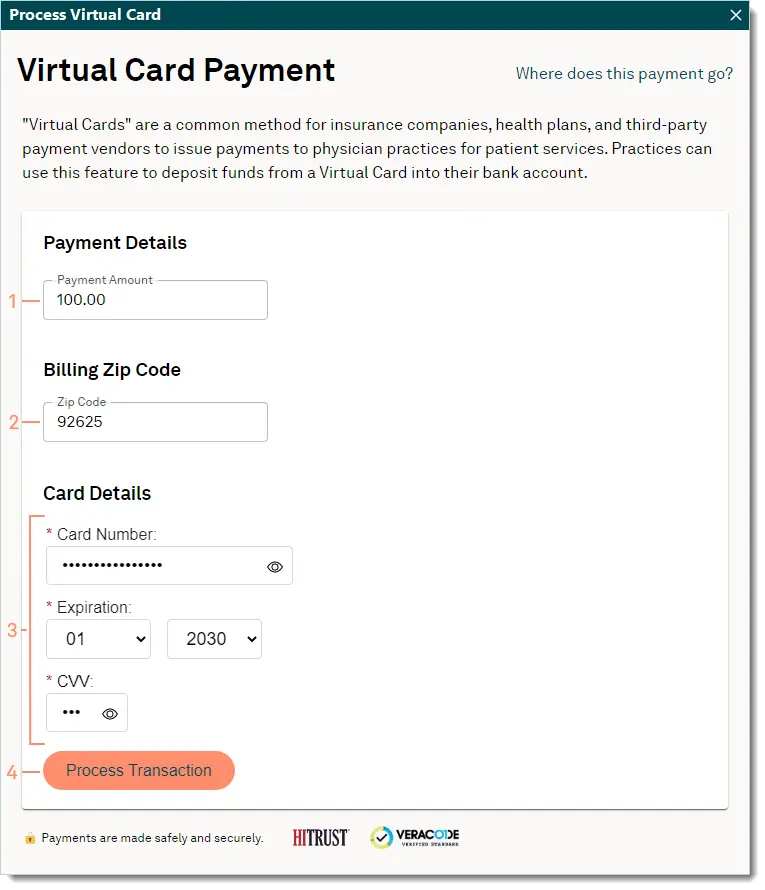
Once processed, staff can add the last four digits of the card and transaction confirmation number to the notes section.

EOB handling
After processing a virtual card payment, consider securely shred the explanation of benefits (EOB) to protect patient information. In special circumstances — such as Medicare crossover claims with patient responsibility — you can scan and upload the EOB to the patient’s document record within Tebra for reference and follow-up.
ERA handling
If an ERA is available, staff should wait to post or reconcile the ERA until the virtual card payment has been confirmed as deposited. This helps prevent duplicate posting, timing discrepancies, and reconciliation errors.
Watch your rates
Providers using Tebra’s EHR may qualify for lower processing rates compared to third-party vendors.
Make virtual cards work for your practice
Virtual cards promise speed, and deliver on it. The practices that manage virtual cards well don't treat them as an afterthought. They build intentional processes and use integrated systems to effectively implement them.
If you're ready to simplify how your practice handles virtual cards, see how Tebra can help.

FAQ
Frequently asked questions
- Payers send a card number and explanation of benefits (EOB)
- Staff enter the card in the terminal/payment system (unless the payer sends an ERA and payments solution allows auto-posting)
- Funds are deposited quickly, typically within 24–48 hours
- EOB data must be manually matched to the patient claim unless the practice uses software that handles it
- Payers reduce mail and processing costs
- Faster payment delivery than paper checks
- Some payers default providers into VCC payments unless they opt out
- Regulatory gray zones allow payers to incentivize or push VCC use
- Manual data entry for each virtual card
- Higher interchange fees compared to ACH payments
- Risk of duplicate posting when card and EOB aren’t aligned
- Missing or delayed matching between the card payment and the claim
- Revenue leakage when cards are untracked or expire before use
- Increased staff workload during busy billing cycles
- Using EHR-integrated payment systems that map card payments to claims
- Creating a daily virtual card inbox/worklist
- Assigning a single team member to process VCCs to reduce duplicates
- Reconciling cards to EOBs before posting
- Tracking unresolved cards through a centralized report
You might also be interested in
- Diagnose and improve your practice’s revenue streams: Discover how to diversify your revenue, lower operating costs, optimize billing, and outshine your competitors with this free 6-chapter workbook.
- Beat insurance and billing challenges: Get free tools that you can start to use now.
- Best medical billing software for private practices: Compare the best medical billing software for private practices, including features, pricing models, and tools.




Subscribe to The Intake: A weekly check-up for your independent practice