- The “best” EHR looks different from one practice to the next. Specialty, practice size, billing model, and day-to-day workflows can lead you to very different shortlists.
- Some EHRs cover more of the practice than others. Tebra connects clinical, billing, patient experience, and AI workflows for independent practices, while ModMed goes deeper in select medical specialties, and SimplePractice and Valant focus on mental health.
- There’s no standard way EHR vendors charge. Among the systems we reviewed, you’ll find monthly subscriptions, per-provider pricing, percentage-of-collections models, and custom quotes, with some tools and services priced separately.
- AI is showing up in a lot more than documentation. Depending on the EHR, it can also support billing, patient communication, clinical work, and other administrative tasks.
Put 10 EHR websites side by side, and you’ll see a lot of the same features. Charting. Scheduling. ePrescribing. Billing. Patient portals. But a feature list can only tell you so much about what it’s actually like to use an EHR every day.
For this guide, we looked into 10 EHR systems physicians may be considering in 2027: what each one does well, where the tradeoffs are, what you can expect to pay, and which types of practices they’re built to support.
Why we put this EHR comparison together
Tebra works with more than 42,000 practices across the US, with a focus on the independent practices this guide is written for. We build technology for their clinical, billing, and patient workflows, and we regularly survey providers about how they work, what takes up their time, and where technology is adding more work instead of taking it away.
Our research shows how much time and energy the work surrounding patient care can take. In Tebra’s survey of 219 US providers at independent practices with fewer than 100 employees:
- More than 1 in 3 reported experiencing burnout.
- Documentation and charting was tied for the top burnout driver, with 16% of providers ranking it #1.
- EHR and technology burdens were the top burnout driver for another 8%.
The EHR is only one part of that picture, but it sits in the middle of a lot of the work physicians do every day. Choosing one has also gotten more complicated as vendors add AI documentation, billing automation, patient communication, analytics, and other tools. Terms like “all-in-one,” “integrated,” and “AI-powered” can mean very different things from one platform to another.
Tebra is one of the EHR systems included in this guide. We’ll tell you where we think Tebra is a strong fit, but we’ll also point out where another platform may make more sense for a particular specialty, practice size, or need.
What EHR comparisons often leave out
EHR vendors often use the same words to describe very different products. “Integrated” might mean everything happens in one platform, or it might mean connecting several products. “AI-powered” could describe an ambient scribe, a billing tool, or a feature that suggests your next step. And a published monthly price may cover only part of what you’ll need.
Here are five areas where it pays to look more closely.
#1 “Integrated” can mean very different things
Two EHRs may both offer billing, scheduling, patient communication, and AI, but those tools may fit together very differently. One platform may let you complete a workflow without leaving the system, while another may rely on separate products, integrations, or manual steps along the way.
That distinction matters because your staff doesn’t use features one at a time. A patient moves from scheduling and intake to the clinical encounter, billing, payment, and follow-up, with information passing between people and systems along the way.
#2 Having a feature doesn’t tell you how well it fits your workflow
A checkmark next to “ePrescribing” or “patient portal” tells you the capability exists. It doesn’t tell you how many clicks it takes, what your staff has to enter manually, or whether the feature works the way your practice needs it to.
#3 Specialty fit matters more than the length of the feature list
A solo therapist, a primary care physician, and a multi-provider dermatology practice may all need charting, scheduling, billing, and patient communication. How they use those tools can be completely different.
Templates, prescribing requirements, coding, clinical workflows, patient intake, reporting, and billing complexity can all vary by specialty.
#4 AI needs to save a step, not add one
“AI-powered” is becoming another common checkmark on EHR comparison tables. But an ambient scribe, coding suggestion, claim-risk flag, and automated patient message solve very different problems.
Where the AI sits in the workflow matters too. A documentation tool that creates a draft inside the EHR is a different experience from one that requires clinicians to copy and paste information between products. The same question applies to AI used for billing, scheduling, and patient communication.
#5 The advertised price may not be the total cost
EHR vendors don’t all charge the same way. You may see monthly subscriptions, per-provider fees, percentage-of-collections pricing, or a custom quote. And even when a vendor publishes a starting price, that number may not include everything your practice will need.
Implementation, data migration, training, payment processing, integrations, additional modules, AI tools, and other services can change the cost. Contract length and what happens to your data if you leave matter too.
How we evaluated the EHR systems on this list
We evaluated each EHR using the same criteria, based on current vendor websites, product documentation, published pricing where available, and other public information.
For each platform, we looked at:
- Clinical workflow and specialty fit: How the EHR supports day-to-day clinical work and which types of practices it's designed for.
- Billing and practice operations: How clinical work connects with claims, payments, scheduling, reporting, and other admin tasks.
- Patient experience: The tools available for scheduling, intake, communication, telehealth, payments, and portal access.
- AI and automation: What the AI actually does and where it fits into the workflow.
- Pricing and total cost: Published pricing or pricing models, when available, along with add-ons and other costs we could verify.
- Interoperability and security: How the EHR exchanges health information with other systems and what vendors disclose about security, HIPAA requirements, and other relevant certifications or standards.
We used information that was publicly available as of October 2026. Because EHR features, pricing, and packaging change, practices should confirm current details directly with each vendor before making a decision.
10 EHR systems to consider in 2027
The EHRs below cover a wide range, from platforms built specifically for small independent practices to systems designed for larger groups or particular specialties. Rather than ranking them from best to worst, we looked at where each one fits, what stands out, and what practices should look at more closely before choosing an EHR.
Tebra
Best fit: Independent practices in primary care, family medicine, behavioral health, and other specialties, including growing multi-provider and multi-location practices that want EHR, billing, patient experience, and AI workflows connected in one platform.
Tebra is a cloud-based EHR and practice platform built for independent practices. Its clinical tools cover charting, ePrescribing, labs, telehealth, scheduling, and specialty-specific documentation, with billing, payments, patient engagement, and practice growth tools available in the same platform.
That broader approach is what separates Tebra from EHRs focused mainly on the clinical side of the practice. A patient can move from online scheduling and intake through the visit, claim, payment, and follow-up without the practice having to piece together a separate system for each part of the experience. Tebra supports more than 50 specialties and provider types, so those workflows can also be configured around different types of care.
Key strengths
- All-in-one platform: EHR, billing, payments, patient engagement, and practice growth tools work together, reducing the need for separate systems.
- Built to grow with your practice: Subscription-based pricing and connected workflows support practices as they add providers, patients, or locations, without charging a percentage of collections.
- Connected clinical and revenue cycle workflows: Documentation, scheduling, eligibility, claims, payments, and A/R reporting work together, helping practices manage care and revenue without switching between separate systems.
- AI across the practice: AI tools support documentation, billing, patient calls, online reviews, and patient feedback.
- Healthcare experience, certification, and security: More than 20 years in healthcare, an ONC-certified EHR, HIPAA-aligned safeguards, and SOC 2 Type 2 attestation.
Things to consider
- Practices that only need basic charting and scheduling may find Tebra's broader platform more than they need.
- Some AI capabilities are priced separately, so practices should confirm what's included in their package and factor add-ons into the total cost.
AI: Tebra AI Smart Staff includes AI Note Assist for clinical documentation, AI Billing Assistant for pre-submission claim review, AI Voice Assistant for patient calls, and AI tools for review responses and patient feedback analysis.
Pricing: Tebra uses subscription pricing rather than charging a percentage of collections. EHR Starter begins at $99 per provider per month for eligible non-physician providers and $199 for physicians. EHR Starter requires Billing Starter, and pricing varies by provider type, claim volume, package, and add-ons.

athenahealth
Best fit: Ambulatory practices and multi-provider groups looking for an EHR closely connected with revenue cycle management and patient engagement.
athenahealth combines EHR, practice management, patient engagement, and revenue cycle management through athenaOne. Its model connects clinical and financial workflows and supports a broad range of ambulatory specialties.
Key strengths
- EHR, practice management, patient engagement, and RCM are available through athenaOne.
- Broad specialty support and health information exchange capabilities.
- Patient tools cover areas such as scheduling, check-in, messaging, and payments.
Things to consider
- athenaOne uses percentage-of-collections pricing rather than a fixed monthly subscription, so costs can increase as collections grow.
- Practices should confirm which newer AI capabilities are available in their specific workflow and package.
AI: athenahealth offers AI for ambient documentation, chart preparation, clinical summaries, and other clinical and administrative workflows.
Pricing: athenahealth does not publish a standard monthly price for athenaOne. Its pricing model is based on a percentage of collections, with specific rates provided through a quote.
eClinicalWorks
Best fit: Ambulatory practices looking for broad EHR and practice management functionality, including options for population health and value-based care.
eClinicalWorks combines EHR and practice management with billing and patient-facing tools. Practices can manage billing internally or use eClinicalWorks' RCM service, while additional products extend the platform into areas such as patient engagement and population health.
Key strengths
- Broad EHR and practice management functionality across many specialties.
- Practices can handle billing internally or use eClinicalWorks for RCM.
- Additional tools support patient engagement, population health, and value-based care.
Things to consider
- Capabilities are spread across multiple eClinicalWorks products, so practices should confirm what is included in the configuration they need.
- RCM services use percentage-of-collections pricing rather than the flat monthly fee used for the core EHR and practice management plans.
- Some optional services and capabilities require additional licenses, agreements, or fees.
AI: eClinicalWorks uses AI for clinical documentation and other clinical, patient, and revenue cycle workflows.
Pricing: eClinicalWorks lists EHR-only software at $499 per provider per month and EHR with Practice Management at $599. Its RCM service is priced at 2.9% of practice collections. Additional charges can apply for certain services and larger implementations.
NextGen Healthcare
Best fit: Specialty and multi-specialty practices that need configurable clinical workflows and more advanced practice management capabilities.
NextGen offers separate products based on practice size. NextGen Office is designed for independent practices with fewer than 10 providers, while NextGen Enterprise serves larger organizations. Both connect EHR workflows with practice management and other operational tools.
Key strengths
- Separate Office and Enterprise offerings for different practice sizes and levels of complexity.
- Broad specialty support with configurable clinical workflows.
- Practice management, patient experience, and revenue cycle capabilities are available alongside the EHR.
Things to consider
- The Office and Enterprise split makes it important to confirm which product contains the capabilities your practice needs.
- Standard EHR pricing is not publicly listed.
AI: NextGen Clinical AI uses ambient listening to create structured draft notes, with additional AI capabilities available across clinical, financial, and operational workflows.
Pricing: NextGen does not publish standard pricing for NextGen Office or NextGen Enterprise. Practices need a custom quote.
ModMed
Best fit: Practices in one of ModMed's supported specialties that want an EHR built around specialty-specific clinical workflows.
ModMed takes a specialty-first approach. Its EMA EHR supports 10 specialties, while gastroenterology practices use gGastro, bringing its current specialty coverage to 11. Practices can also add practice management, patient engagement, analytics, billing services, and other tools.
Key strengths
- EHR workflows and clinical content are built specifically for the specialties ModMed serves.
- Documentation can connect with downstream actions such as prescriptions, orders, and coding.
Things to consider
- ModMed currently serves 11 specific specialties, so it isn't an option for every practice.
- Not every ModMed product is available for every specialty, making it important to confirm what is included in a particular setup.
AI: ModMed Scribe 2.0 provides AI-assisted clinical documentation within EMA, with additional AI capabilities being used across other practice workflows.
Pricing: ModMed does not publish standard EHR prices. Pricing varies by specialty, products, and configuration.
SimplePractice
Best fit: Solo and small-group behavioral health practices looking for an EHR designed around therapy workflows.
SimplePractice brings documentation, scheduling, billing, telehealth, intake, and client communication together for behavioral health and other health and wellness providers.
Key strengths
- Documentation, scheduling, telehealth, intake, and client communication are available in the same platform.
- Supports both self-pay and insurance-based practices.
Things to consider
- Its specialty focus makes it less suitable for medical practices that need broader clinical workflows.
- ePrescribing, AI, and some other capabilities carry additional fees.
AI: SimplePractice offers Note Taker for AI-assisted documentation and Care Aide for additional AI-supported clinical and administrative tasks.
Pricing: SimplePractice plans currently start at $49 per month for Starter, $79 for Essential, and $99 for Plus. Add-ons and insurance claim fees can increase the total cost.
AdvancedMD
Best fit: Independent and multi-provider practices looking for a configurable EHR with practice management and medical billing options.
AdvancedMD combines EHR and practice management with scheduling, patient engagement, billing, and reporting. Practices can manage billing themselves or use AdvancedMD's outsourced RCM services.
Key strengths
- Clinical, scheduling, and billing workflows can be managed within the broader AdvancedMD platform.
- Supports a range of medical and behavioral health specialties.
- Practices can choose between in-house billing tools and outsourced RCM.
Things to consider
- AdvancedMD offers a broad set of products and add-ons, so practices should confirm exactly what is included in their quote.
- Data migration and AI can add to the cost, depending on the services selected.
AI: AdvancedMD's AI Clinical Assistant supports ambient transcription, note generation, pre-visit summaries, and other documentation tasks.
Pricing: AdvancedMD uses custom pricing for its core software. Its AI tools are currently offered as an add-on at $100 per provider per month for unlimited encounters or $0.99 per encounter.
Practice Fusion
Best fit: Smaller independent practices looking for a relatively straightforward EHR with a lower published starting price.
Practice Fusion focuses on the core needs of independent medical practices, including charting, ePrescribing, labs and imaging, scheduling, patient records, and a patient portal. It also offers billing software and billing services for practices that want to connect clinical and financial workflows.
Key strengths
- Core EHR functionality aimed at smaller independent practices.
- Published starting price and a 14-day free trial.
- Billing services and additional practice tools are available alongside the EHR.
Things to consider
- Its core EHR offering is narrower than platforms that combine a larger set of patient experience, marketing, and automation capabilities.
- Practices should compare the cost of any billing services, patient engagement tools, or other additions they would need.
AI: Practice Fusion has added AI-assisted clinical documentation, with its current AI offering focused primarily on the documentation workflow.
Pricing: Practice Fusion starts at $199 per provider per month with a required annual commitment. Additional products and services may cost extra.
Valant
Best fit: Behavioral health practices that need an EHR built for therapy and psychiatry, including groups with more specialized workflows.
Valant is built specifically for behavioral health, with clinical and administrative workflows for therapy and psychiatry. It also supports areas such as measurement-based care and more complex behavioral health programs, including IOP and PHP.
Key strengths
- Purpose-built behavioral health workflows for therapy and psychiatry.
- Integrated outcome measures and measurement-based care capabilities.
- Billing tools are built in, with additional RCM services available.
Things to consider
- Its behavioral health focus means practices outside mental health will need a different EHR.
- Standard pricing is not publicly listed, so practices need a quote to understand total cost.
AI: Valant AI Notes Assist generates structured draft notes for therapy and psychiatry workflows inside the EHR.
Pricing: Valant doesn't publish standard monthly prices. Pricing varies by user type, practice workflow, and selected features.
OmniMD
Best fit: Independent and multi-specialty practices looking for EHR, practice management, billing, and AI capabilities.
OmniMD offers a cloud-based EHR with practice management, billing, patient-facing tools, and specialty-specific workflows. Its portfolio also includes outsourced RCM and AI products.
Key strengths
- EHR and practice management support a range of ambulatory specialties.
- Billing and RCM options are available alongside the clinical platform.
- Specialty-specific templates and workflows are available for more than 20 specialties.
Things to consider
- EHR, RCM, AI, and other capabilities can be sold as separate products or add-ons, so practices should confirm exactly what is included in their quote.
- Standard pricing isn't clearly published, making it difficult to compare total cost without requesting a quote.
AI: OmniMD offers ambient documentation as well as AI tools for front-desk, coding, and revenue cycle workflows.
Pricing: OmniMD uses flat per-provider pricing rather than percentage-of-collections pricing, but it does not publish a standard dollar amount. Practices need a quote based on their selected products and services.
EHR software comparison at a glance
We understand that’s a lot to compare, so to make it easier, here’s a quick look at how the 10 EHR systems stack up across practice fit, pricing, and AI.
| EHR | Best fit | Pricing | AI focus |
| Tebra | Independent practices that want EHR, billing, patient experience, and AI connected in one platform | EHR Starter from $99/provider/month; Billing Starter required | Documentation, billing, patient calls, reviews, and patient feedback |
| athenahealth | Ambulatory practices and multi-provider groups | Percentage of collections; custom quote | Documentation, chart preparation, clinical summaries, and administrative workflows |
| eClinicalWorks | Ambulatory practices, including those using population health or value-based care tools | Starting at $499/provider/month | Documentation, patient, clinical, and revenue cycle workflows |
| NextGen Healthcare | Specialty and multi-specialty practices | Custom quote | Documentation, clinical, financial, and operational workflows |
| ModMed | Practices in its supported specialties | Custom quote | Documentation and other specialty practice workflows |
| SimplePractice | Solo and small-group behavioral health practices | Starting at $49/month | Documentation and administrative support |
| AdvancedMD | Independent and multi-provider practices | Custom quote | Documentation and pre-visit support |
| Practice Fusion | Smaller independent medical practices | Starting at $199/provider/month | Clinical documentation |
| Valant | Behavioral health practices, including therapy and psychiatry | Custom quote | Therapy and psychiatry documentation |
| OmniMD | Independent and multi-specialty practices | Flat per-provider pricing; custom quote | Documentation, front desk, coding, and revenue cycle workflows |
Pricing note: Starting prices aren't directly comparable because included features, provider types, add-ons, billing services, and contract requirements vary by vendor.
A table can narrow down your options, but the real test is how an EHR fits the way your practice works. Here’s what to look at before you choose.
Best EHR by practice scenario
Another way to compare EHR systems is to look at which ones fit your practice's specific needs. Here's how the EHRs on our list compare across common practice scenarios.
| Practice scenario | EHR systems to consider | Why they may fit |
| Primary care practices | Tebra, athenahealth, eClinicalWorks | Tebra connects clinical documentation, scheduling, billing, patient communication, and practice growth tools. athenahealth and eClinicalWorks offer broad ambulatory EHR and practice management capabilities. |
| Behavioral health practices | Tebra, SimplePractice, Valant | Tebra combines clinical, billing, and patient engagement workflows for independent behavioral health practices. SimplePractice focuses on solo and small-group therapy, while Valant offers specialized workflows. |
| Growing independent practices | Tebra, AdvancedMD, eClinicalWorks | Tebra brings EHR, revenue cycle management, patient experience, and AI tools together as practices add providers or expand operations. AdvancedMD offers configurable workflows, while eClinicalWorks provides broad practice management capabilities. |
| Practices adding providers or locations | Tebra, NextGen Healthcare, athenahealth | Tebra's connected platform and subscription pricing can support changing practice needs. NextGen and athenahealth offer options for practices evaluating more complex operational requirements. |
| Solo practices focused on core clinical needs | Practice Fusion, SimplePractice, Tebra | Practice Fusion offers core clinical functionality. SimplePractice is designed for solo behavioral health providers. Tebra is worth considering when practices also want connected billing and patient engagement capabilities. |
| Specialty-focused medical practices | ModMed, NextGen Healthcare, Tebra | ModMed offers workflows for supported specialties. NextGen provides specialty-focused solutions, while Tebra supports more than 50 specialties and provider types. |
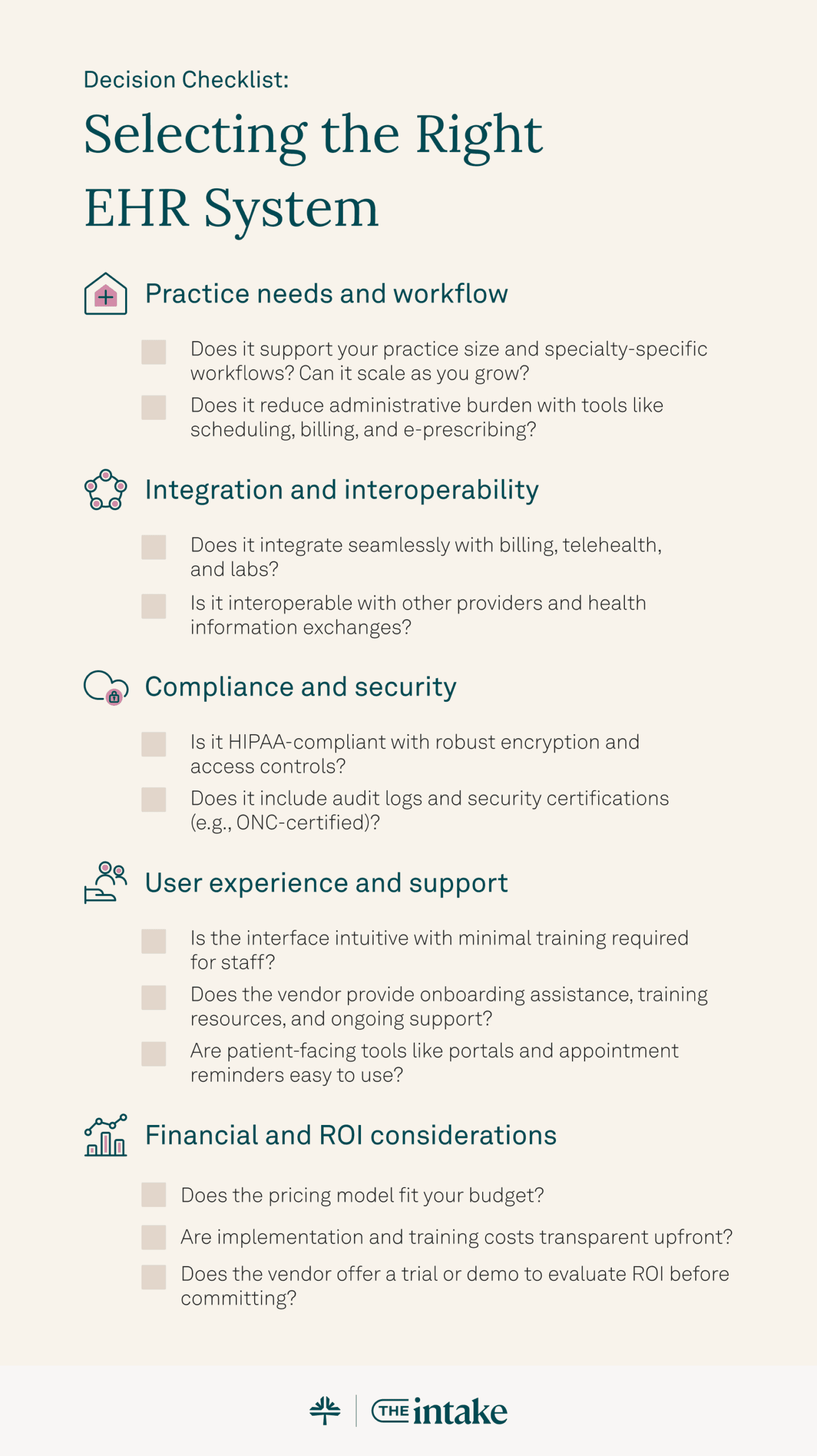
How to choose the right EHR for your practice
Sometimes, the best place to start isn’t with a vendor or a feature list. It’s with the problems you want a new EHR to solve.
Our guide to selecting the right EHR for your independent practice walks through what to consider before making a decision.
Start with what isn’t working today
Before comparing features, identify where your current workflows create the most friction. Are providers finishing notes after hours? Is the front desk spending too much time on scheduling and patient calls? Are billing staff moving between systems or re-entering information?
Starting with actual problems gives you a much better filter for evaluating an EHR than a long list of features you may or may not use.
Separate your must-haves from your nice-to-haves
Some requirements should eliminate an EHR from consideration immediately. That might include specialty-specific documentation, ePrescribing, certain integrations, billing capabilities, telehealth, reporting, or support for multiple providers and locations.
Once you know the non-negotiables, it becomes easier to figure out which capabilities your practice actually needs from features that simply look good in a demo.
Ask vendors to show you YOUR workflow, not theirs
A polished product demo is designed to show an EHR at its best. Make the demo more useful by giving the vendor a few scenarios your team handles regularly and asking them to walk through each one.
For example, ask to see what happens from online scheduling and intake through the visit, documentation, claim submission, payment, and patient follow-up. Pay attention to where staff have to switch systems, enter the same information twice, or complete a step manually.
Talk to practices that look like yours
Before signing, ask vendors for references from customers with a similar specialty, practice size, and billing setup. A five-provider dermatology group may have a very different experience from a solo therapist or a 50-provider multi-specialty organization, even when they're using the same EHR.
Ask those practices what implementation was actually like, what they wish they had known before switching, which features their teams use every day, and where they still rely on workarounds.
What EHR pricing doesn’t always tell you
We’ve mentioned pricing a few times already, but it’s worth digging a little deeper. The price you see on an EHR website is a useful starting point, but it may not be what your practice actually pays.
Two systems with similar starting prices can end up costing very different amounts depending on what’s included, how the vendor charges, and which additional tools or services your practice needs.
So before comparing the numbers, make sure you know what’s behind them.
Start with what the price actually includes
A monthly price might cover the EHR itself, but what about practice management, telehealth, patient engagement, reporting, or billing?
The same goes for AI. Some vendors include certain AI capabilities in their plans, while others charge separately by provider, encounter, or product.
This is why comparing two starting prices side by side can be misleading. Make sure you’re comparing the setup your practice would actually use.
Then look at how you’re being charged
The number matters, but so does the pricing model behind it.
Some EHR vendors charge a flat monthly subscription or per-provider fee. Others charge a percentage of collections, particularly when billing or revenue cycle services are part of the package.
Run both models against your actual provider count and collections. A pricing model that works well for a small practice today may look very different as you add providers or your revenue grows.
Don’t forget the costs around the EHR
Once you know the base price and pricing model, ask what else could appear on the bill.
Depending on the vendor and package, that could include implementation, data migration, training, integrations, payment processing, claims, ePrescribing, AI tools, additional users, or additional locations.
Not every vendor charges separately for these things. That’s exactly why it’s worth asking. A quote is much easier to evaluate when you know which costs are included and which aren't.
And read the contract as closely as the quote
A good monthly price can look less attractive if it comes with terms that don’t work for your practice.
Find out whether you’re committing to a month, a year, or multiple years. Ask whether the price can change during that period and what happens to your bill when you add or remove providers.
While you’re there, check the cancellation terms and whether there are costs associated with getting your data out if you eventually decide to switch.
Finally, compare your price, not the advertised price
By this point, you should be able to ask each vendor for something much more useful than a starting price: what would this EHR cost for our practice?
Give vendors the same basic requirements, including your provider count, the products you need, your billing setup, the AI capabilities you want, and any necessary integrations. Then compare those quotes side by side.
That won’t make EHR pricing perfectly apples to apples, but it gets you a lot closer.
Where AI should fit into your EHR decision
We keep bringing up AI throughout this guide as well, mostly because, by 2027, it’s becoming harder to evaluate an EHR without considering it. But the number of AI features a vendor offers probably isn’t the most useful way to compare them.
A better question is: What work will the AI actually take off your team’s plate?
Start with the work taking up the most time
If documentation is keeping providers late, an ambient documentation tool may be high on your list. It also helps to clean up your EHR documentation habits, such as templates and note structure, so AI drafts land in a simpler workflow. If your billing team spends hours reviewing claims, look at how AI is being used before and after submission. If your front desk is overwhelmed by calls, scheduling, and patient messages, clinical AI alone won’t solve that problem.
In other words, start with the workload, then look for the AI that addresses it.
Look at where the AI lives
An AI tool can be useful on its own, but where it sits in your workflow makes a difference.
For example, if an ambient documentation tool creates a draft note, where does that draft go next? Can the provider review and complete it inside the EHR, or does information need to be copied between systems?
Ask the same questions about AI used for billing, scheduling, patient communication, and other workflows. The fewer extra steps your team has to add around the AI, the more useful it’s likely to be day to day.
Ask what happens after the AI does its part
A good demo shouldn’t stop when the AI produces an output.
If it drafts a note, what does the provider need to review before signing it? If it flags a claim, who decides what happens next? If it answers a patient call, how does it handle a question it can’t resolve?
This is also where you can get past impressive demos and understand how much human review and follow-up the tool still requires.
Find out what the AI will actually cost you
And yes, we’re back to pricing for a moment.
Some AI capabilities may be included with the EHR or another package, while others are sold separately or priced per provider, encounter, or use. If AI is one of the reasons you’re considering a particular EHR, include those costs in the quote you compare, rather than treating them as an add-on you’ll figure out later.
Don’t let AI outweigh the rest of the EHR
AI is changing quickly, and the capabilities available this year will almost certainly keep evolving. Your EHR still needs to work well when no AI is involved.
Clinical workflows, specialty fit, billing, interoperability, patient experience, reliability, security, and support still matter. AI should make those workflows easier, not compensate for an EHR that doesn’t otherwise fit your practice.
What to verify before you sign
So, you’ve narrowed down your options, sat through the demos, and compared the quotes. You may even have a frontrunner. But before you sign, there are a few questions worth getting clear answers to, especially the ones that don’t always come up in a sales demo.
Make sure you know what happens to your data
Your practice is going to put a lot of information into this system. You should know how easily you can get it back out.
Ask what data you can export, what format it comes in, how long an export typically takes, and whether there’s a fee. And if you’re switching from another EHR, get specific about migration too. What will the vendor move for you, and what will your team be responsible for?
This may not feel urgent while you’re shopping for a new system, but it can become very urgent if you ever decide to leave.
Go beyond “HIPAA compliant”
You’ll see some version of “HIPAA compliant” on plenty of healthcare software websites. Don’t let that be the end of the conversation.
Ask whether the vendor will sign a business associate agreement (BAA), how your data is encrypted, what access controls are available, and how the company handles security incidents. Look for independent security attestations, such as SOC 2 Type 2, and verify whether the specific EHR product and version are ONC-certified.
Check interoperability and prescribing capabilities
If your practice relies on particular labs, pharmacies, clearinghouses, imaging systems, or other tools, don’t settle for hearing that the EHR “integrates” with them. Ask to see how the connection works for the exact systems you use.
Does information move both ways? Does the EHR support health information exchange (HIE) or APIs for sharing patient records? Is anything still entered manually? Is additional setup required, and does it cost extra?
If your providers prescribe controlled substances, confirm that the system supports electronic prescribing of controlled substances (EPCS), including any additional setup or identity verification requirements.
Find out what support looks like after launch
Implementation gets a lot of attention during the buying process. What happens a month later when someone on your team needs help?
Ask who you’ll contact, when support is available, whether support costs extra, and what training resources your team can come back to. If you’ll have a dedicated implementation contact, find out what support looks like once that person is no longer your main point of contact.
Yes, ask how you can leave
It may feel strange to ask about leaving before you’ve even signed up, but this is exactly when you want to know.
How long is the contract? Does it renew automatically? How much notice do you need to give? Are there termination fees? And if you leave, how do you get your data back?
Hopefully, you won’t need those answers for a long time. But if you do, you’ll be glad you asked before your signature was on the contract.
Planning an EHR switch without disrupting your practice
Finally, once you’ve chosen a new EHR, the next question is how to make the move without creating chaos for your team or patients. Most of that comes down to three things: the data, the people, and the timing.
Know what’s moving, and what isn’t
Get a clear migration plan before you set a go-live date. Confirm which records and data will move into the new EHR, what may need to remain accessible in the old system, and whether anything will require manual work from your team.
This can also be a good time to clean up duplicate or outdated information instead of carrying it into the new system.
Train your team around their actual jobs
Your providers, front desk, and billing staff use the EHR differently, so their training should look different too.
Give each group time to practice the workflows they’ll actually handle. It can also help to run through a few typical patient scenarios before launch. That’s when you want to discover that someone doesn’t know where to find a migrated record or what happens after a claim is submitted, not during a packed clinic day.
Give go-live some breathing room
There will probably be questions once people start using the new system for real. If you have flexibility, don’t choose your busiest day to launch.
Make sure everyone knows where to go for help and who on your team is responsible for escalating problems to the vendor. Then, a few weeks in, check with the people actually using the EHR. You’ll usually have a much better sense by then of what needs more training, a configuration change, or a call to support.
Frequently asked questions
- Specialty fit and usability: Templates, prescribing, and documentation workflows that match how you practice.
- Billing and practice management: Whether billing lives in the same platform, or connects through third-party products.
- Patient workflows: Scheduling, intake, telehealth, and patient payments.
- Interoperability and security: Whether the vendor signs a business associate agreement (BAA), how it handles encryption, and whether it connects with the labs and pharmacies you use.
- AI and automation: what work the AI takes off your team, and where it sits in the workflow.
- Total cost: Pricing model, add-ons, contract length.
- Implementation and support: Data migration, training and help after you launch.

You might also be interested in
- How to select an EHR: A comprehensive guide: A step-by-step walkthrough for evaluating EHRs based on features, ease of use, and support.
- How to evaluate EHR vendors (side-by-side matrix): Compare leading systems to see which one fits your clinical and administrative needs.
- Want to see how Tebra compares? Book a free demo and explore a modern EHR built for independent physicians.
- Current Version – Oct 28, 2026Written by: Ana BatareloChanges: Full rewrite.
- Dec 04, 2025Written by: Jean LeeChanges: Updated to include the most recent information available.
- Oct 20, 2025Written by: Ryan YatesChanges: Cleaned up formatting and links.
- Sep 12, 2025Written by: Jean LeeChanges: This article was updated to include the most relevant and up-to-date information available.
- Aug 20, 2025Written by: Jean LeeChanges: This article was updated to include the most relevant and up-to-date information available.
- Jul 01, 2025Written by: Jean LeeChanges: This article was updated to include the most relevant and up-to-date information available.
- Apr 07, 2025Written by: Becky WhittakerChanges: This article was updated to include the most relevant and up-to-date information available.
- Dec 10, 2024Written by: Becky Whittaker

Subscribe to The Intake: A weekly check-up for your independent practice